Summary. A DGX Spark has 2 QSFP ports rated at 200 Gb/s each, but they are not 400 Gb/s of network. The ConnectX-7 reaches the SoC over 2 PCIe Gen5 x4 links, so the whole box gets about 200 Gb/s per direction, and a single cable only delivers it if you load both links. That one fact sets every layout: 1 cable for 2 Sparks, 3 cables in a triangle for 3, a ring or a switch for 4, and a switch beyond that. On cables, 12 of the 13 I tested on my own pair gave an identical 185.1 Gb/s. The 13th ran clean for 101 minutes at idle, then dropped the link 3 minutes into a GPU burn.
I run 2 ASUS Ascent GX10s, which use the same GB10 superchip and the same ConnectX-7 as a DGX Spark, joined by one cable. Everything labelled as mine below was measured on that pair. I have not built a 3-node ring, a 4-node ring or a switched cluster, so those sections rest on NVIDIA’s documentation and on other people’s reports, and each number there says whose it is.
One word before the hardware: people often say “router” for the box in the middle of a 4-node cluster. You want a switch. NVIDIA’s instructions put all Spark-facing ports on one Layer 2 network, and nothing gets routed.
The ConnectX-7: 2 ports, 2 rails
Three numbers describe the NIC, and they are easy to confuse.
| Limit | Value | What sets it |
|---|---|---|
| One QSFP port | up to 200 Gb/s | The port itself |
| One rail (PCIe path to the SoC) | about 100 Gb/s | One PCIe Gen5 x4 link |
| The whole box, both ports together | about 200 Gb/s per direction | 2 rails, shared by both ports |
The SoC cannot give one device more than x4, so NVIDIA attached the NIC through 2 separate x4 links. Each QSFP port is reachable over both of them, which is why one port appears twice in Linux:
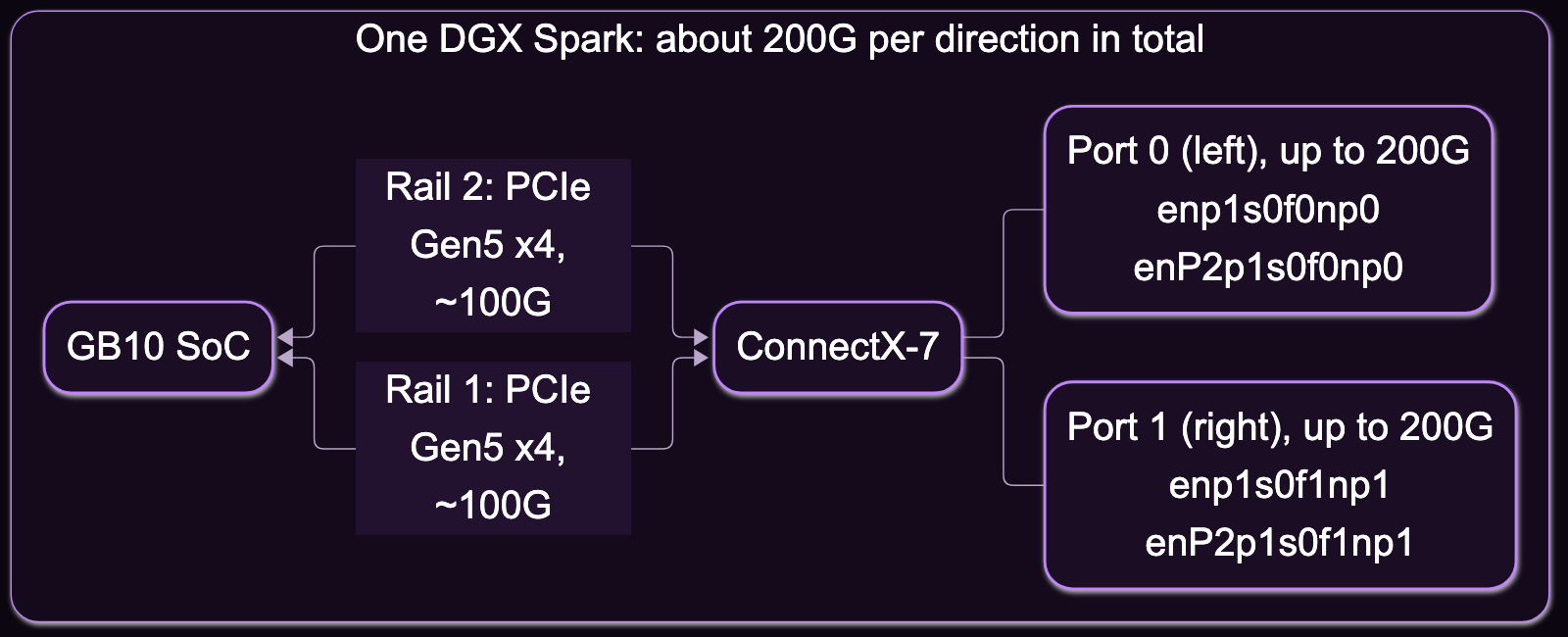
The RoCE devices follow the same pattern: rocep1s0f1 and roceP2p1s0f1 for port 1, for example.
Seen from the back, port 0 is the one closest to the ordinary Ethernet port. The names are the same on every box, per NVIDIA’s guide. My GX10s use the same names.
Here is what that looks like on my pair, one cable, port 1 to port 1:
| Test (mine) | Result |
|---|---|
ib_write_bw, one rail | 108.9 Gb/s |
ib_write_bw, both rails at once | 92.56 + 92.56 = 185.1 Gb/s |
| NCCL all-reduce, one rail | 13.6–13.9 GB/s |
| NCCL all-reduce, both rails | 18.3–19.0 GB/s |
One-way RDMA latency (ib_write_lat, typical) | 1.42–1.96 µs |
NVIDIA’s own two-Spark procedure publishes 189.85 Gb/s for the same test.
An open item on my side: 185.1 Gb/s is 23.1 GB/s, and my NCCL figure is well under that. Others get closer. NADDOD reports 23.76 GB/s at 2 nodes with 16 GiB messages and NCCL 2.30.7, while mine were 256 MB to 1 GB messages on NCCL 2.28.9. I have not rerun mine with their settings, so treat 19 GB/s as what I measured, not as a ceiling.
Three consequences follow, and they save money:
- A second cable between the same 2 Sparks adds nothing. The playbook says so directly: “Using two cables will not increase performance.”
- A faster cable adds nothing. The port is capped at 200 Gb/s, whatever is printed on the cable.
- You must use both rails on purpose. NCCL needs both RoCE devices of a port, or you get half the bandwidth with no error.
There is one more trap for anyone planning a 4-node mesh. The rails split on the PCIe side, not at the port, so a 200G-to-2×100G breakout on the Spark end does not give you 2 links. Resilient Tec, a cable seller, collects forum reports of one leg coming up and the other staying dead. A Spark has exactly 2 neighbours.
Choosing the cable
NVIDIA approves 2 cables, both passive QSFP112 DACs: the Amphenol NJAAKK-N911 (400 mm, 32 AWG; NJAAKK0006 is the 0.5 m version) and the Luxshare LMTQF022-SD-R (400 mm, 30 AWG). The guide’s own rule is simpler: at least 200 Gb/s, Ethernet.
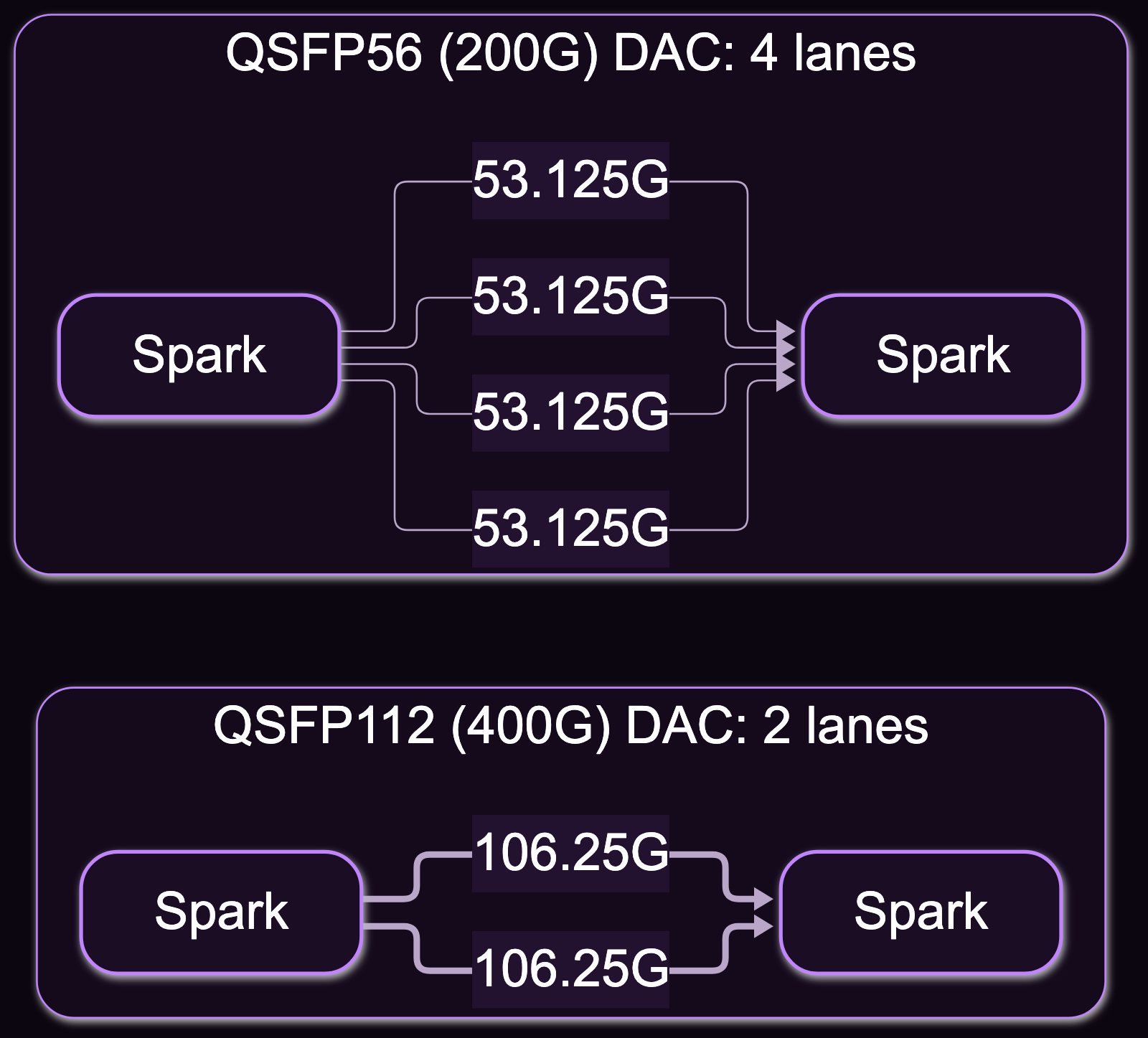
In practice 2 cable families work, and they do not link the same way. This is the part I have not seen written down elsewhere:
| Cable | Link the Spark negotiates | Lanes used | Rate in /sys/class/infiniband/<dev>/ports/1/rate |
|---|---|---|---|
| QSFP112 (“400G”) DAC | 200 Gb/s | 2 × 106.25G | 2X NDR |
| QSFP56 (200G) DAC | 200 Gb/s | 4 × 53.125G | 4X HDR |
So a 400G cable on this port is not running at half strength on 4 lanes. It uses 2 lanes at the higher rate. A QSFP56 cable uses all 4 at half that rate.
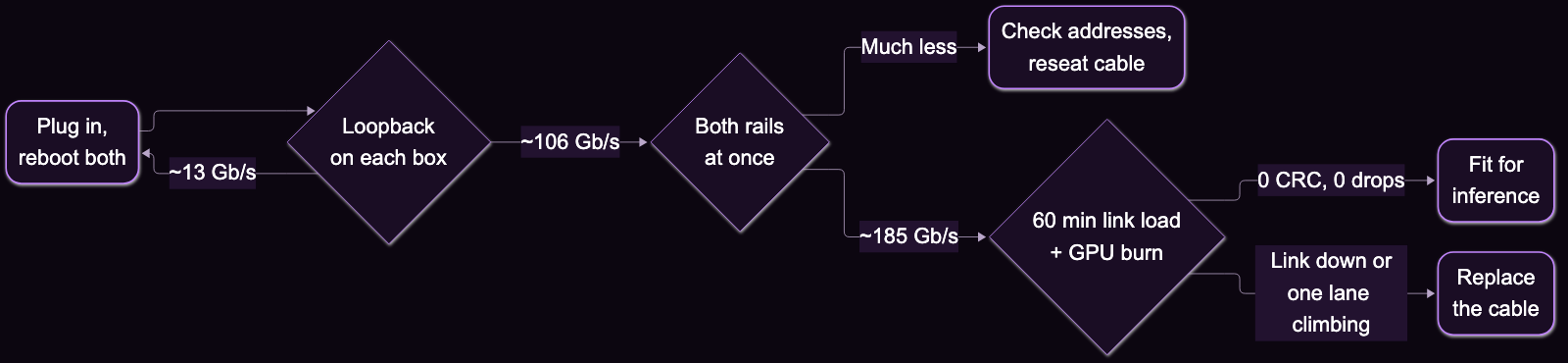
I have now tested 13 cables on this pair, with the same procedure each time: NVIDIA’s benchmarks, then 10 minutes of saturated link at idle, then 60 minutes of saturated link with the GPUs burning on both boxes. The original cable predates the heat test, but it served inference for weeks without a drop.
| Cable family | Tested | Throughput | Worst-lane pre-FEC BER | Outcome |
|---|---|---|---|---|
| QSFP112, 2 lanes | 9 | 185.1 Gb/s, all of them | about 10⁻⁸ to 4×10⁻⁷ | 9 fine (0 CRC errors) |
| QSFP56, 4 lanes | 3 | 185.1 Gb/s, all of them | 0 (no FEC corrections in any sample) | 3 fine |
| QSFP56 clone, 4 lanes | 1 | ~195 Gb/s each way in the idle soak | ~5×10⁻⁸ until it failed | Dropped the link under heat |
Reading this table takes some care, in both directions.
Speed does not separate cables. Every cable that finished the benchmark hit the same number, so a throughput test only tells you the cable is not broken.
4 lanes looked far cleaner than 2. The 3 good QSFP56 cables logged zero corrected errors across 70 minutes, including heat to 82 °C, while every QSFP112 cable logged a steady trickle. That trickle is harmless: the RS-FEC limit is around 2×10⁻⁴, more than 2 orders of magnitude above the worst cable, and none produced a CRC error. It looks like a margin effect of the higher symbol rate, though 3 cables from 2 batches, all 0.5 m, is not a proof.
The cable that failed was a QSFP56. Don’t take “QSFP56 is safer” from the row above. This clone, labelled ONT-DAC-QS56-0.5, ran a saturated link for 101 minutes with idle GPUs, with 0 drops and 0 CRC errors. With the GPUs burning, one lane went from about 2.9k to 11.7 million errors per second as the NIC reached 81 °C, 3.1 minutes in, and the link went down on both boxes. In service it had flapped 4 times in 20 hours, and each flap killed the distributed inference engine. Its error rate 30 seconds before the collapse looked harmless; the only warning was one lane logging about 1000× more errors than the others.
So my rules for buying a cable:
- Default to an approved QSFP112, or a QSFP56 from a named source. The approved parts are the ones NVIDIA will talk to you about. A 200G MCP1650-V00AE30 QSFP56 is the cheap alternative that field reports back up ($79 against $174 for the NJAAKK-N911 at Resilient Tec in November 2026, on a seller’s page), but it is not on NVIDIA’s list.
- Buy the shortest that reaches. 0.5 m suits stacked boxes. Sellers list passive 200G QSFP56 up to 3 m. I have tested nothing longer than 0.5 m, and I found no primary source on AOCs or optics in the Spark’s cages, so past 3 m you are on your own.
- Read the EEPROM, and distrust it.
sudo ethtool -m enp1s0f1np1shows what you bought. The failed cable reported 0 dB attenuation at 7 and 12.9 GHz, which is a placeholder, not a measurement. Copper length in SFF-8636 EEPROMs is in whole metres, so a 0.5 m cable may read 1 m. - Heat-test anything that will carry inference. Saturate the link with the GPUs burning on both boxes, then watch the per-lane
rx_err_lane_N_phyrate on both receivers. An idle test would have passed the one cable that failed.
What to check after you plug it in
There is a trap that makes every cable look bad. On my boxes, a cable swap or a kernel update can leave the NIC throttled to about 13 Gb/s, while the link still reports 200 Gb/s and ethtool looks fine. A loopback ib_write_bw with both ends on one box takes 10 seconds and uses no wire: about 106 Gb/s means the NIC is healthy, about 13 Gb/s means it is throttled. A reboot of both boxes has cleared it for me, usually, though on 2026-11-05 it took 2 attempts. itadmin.blog reports needing a full AC drain, 60 s unplugged. Try the reboot first and let the loopback decide. The 27W insufficient power line in dmesg appears in both healthy and throttled states, so ignore it.
Which cable for which layout
| Layout | What to buy | Count |
|---|---|---|
| 2 Sparks | 0.5 m QSFP112 or QSFP56 DAC | 1 |
| 3 Sparks, triangle | Same | 3 |
| 4 Sparks, ring | Same; lengths may need planning | 4 |
| 4–8 Sparks, 400G-port switch | 400G QSFP-DD to 2× 200G QSFP56 breakout (MCP7H60-W00x class), switch side only | 1 per 2 Sparks |
| 4–8 Sparks, a free switch port per Spark | Straight 200G QSFP56 DAC, 1–3 m | 1 per Spark |
Note the family on the switch rows. The MikroTik 400G switches below have 50G lanes, so the Spark runs 4 lanes there, and the field reports I found use QSFP56. I have not tried a QSFP112 cable on one.
2 Sparks: 1 cable
This is the setup I run. Use port 0 on both ends or port 1 on both ends; NVIDIA’s helper expects them to match.
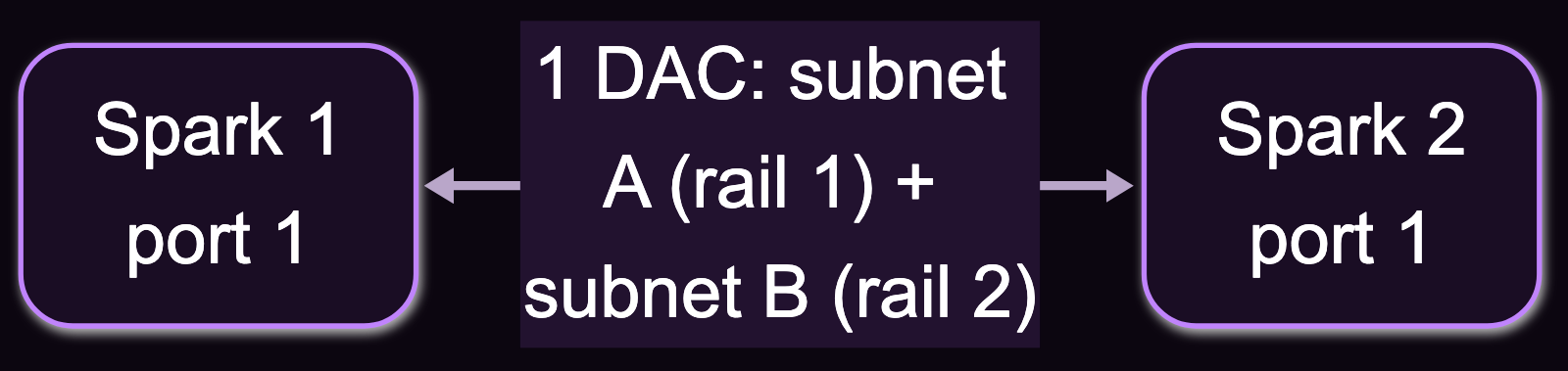
The address plan follows from the rails: 2 /24 subnets over the 1 cable, one per rail. NVIDIA’s playbook now does this with a helper from spark-vllm-docker (run it from one of the Sparks):
./setup-cluster.sh 192.168.1.11 192.168.1.12 --topology direct --mtu 9000 --dry-run
NVIDIA specifies MTU 9000 for this layout only; on my link it gave no gain over 1500. For NCCL, name both devices of the port you cabled:
export NCCL_IB_HCA=rocep1s0f1,roceP2p1s0f1
Then check for both names in the NCCL_DEBUG=INFO output. One name and about 13.9 GB/s means you are on a single rail.
3 Sparks: a triangle of 3 cables
No switch needed. Each Spark uses both ports, and 3 nodes in a ring are also a full mesh, so every node is 1 hop from every other. The wiring is specific: port 0 always goes to port 1 of the next box.
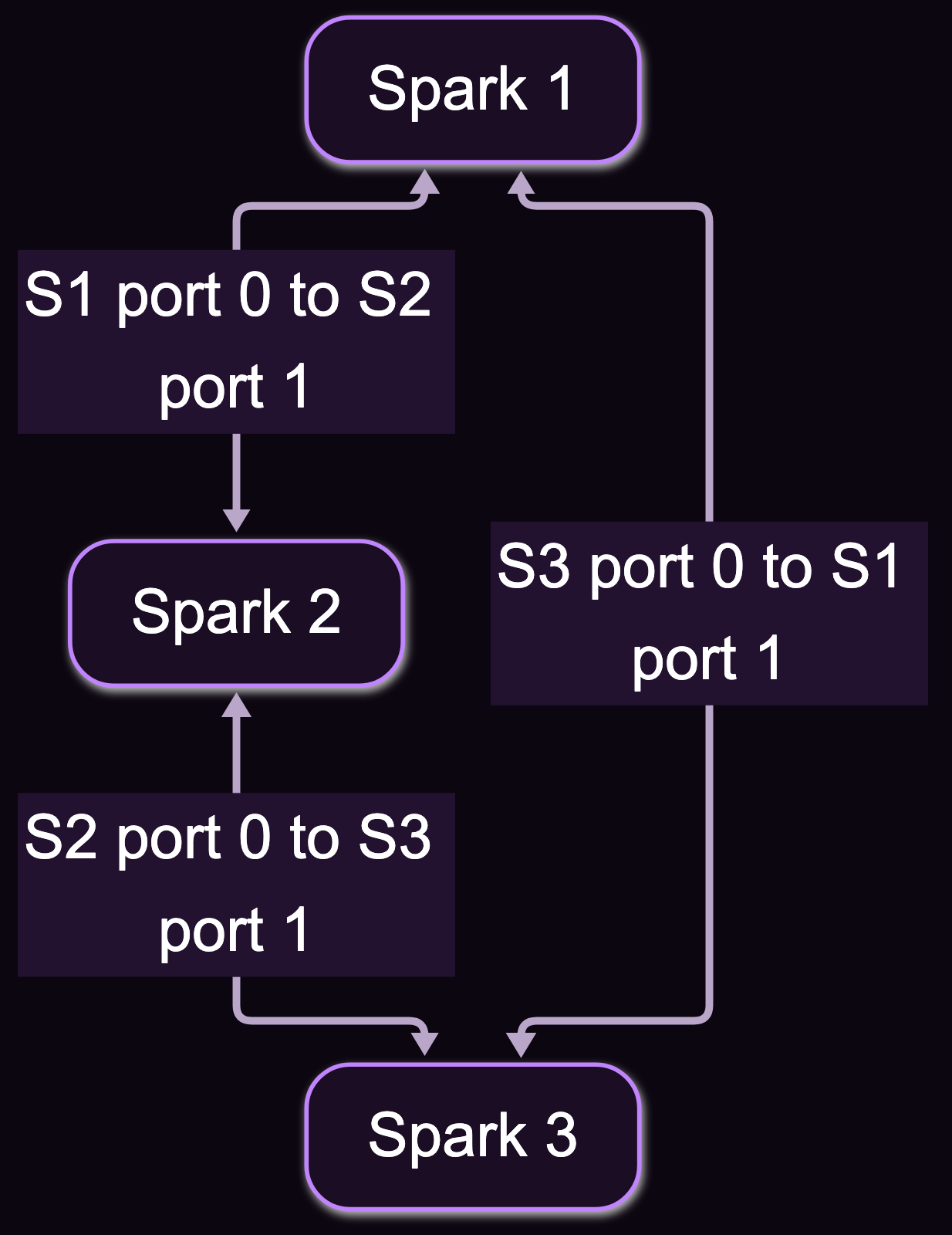
That makes 2 subnets per cable, 6 in total. The helper calls this layout mesh, and NVIDIA says to use MTU 1500 here. NVIDIA Sync’s Cluster Assistant supports it too: up to 3 Sparks directly, 4 through a switch.
./setup-cluster.sh 192.168.1.11 192.168.1.12 192.168.1.13 --topology mesh --mtu 1500 --dry-run
The bandwidth is where the “200 Gb/s per port” line misleads. Each cable can carry 200 Gb/s when it is the only one busy, but the box still has its 2 rails. With traffic to both neighbours at once, plan on about 100 Gb/s to each. The spark-vllm-docker notes give the same 100G figure for each pair.
That should matter less than it sounds for inference, though I have not measured it at 3 nodes. On my pair, serving a 284B model tensor-parallel used 0.64% of the link. Bulk transfers such as weight copies will feel the split.
4 Sparks: ring or switch
Here you have a real choice. A full mesh is impossible, since it needs 3 links per node and a Spark has 2.
The ring takes 4 cables, port 0 to port 1 of the next box, and the last one closes back to Spark 1. Spark 1 and 3 are not directly connected, and neither are 2 and 4. The playbook documents it, with 8 subnets and --topology ring, but only on the manual path: NVIDIA Sync does not configure it. Older write-ups call the ring unsupported and needing a custom NCCL build, so check the date on anything you read. In a stacked rack, one cable tip from Resilient Tec is worth stealing: wire 1→2→4→3→1 so no cable spans the whole stack, then list the nodes to the helper in cabled order, not rack order.
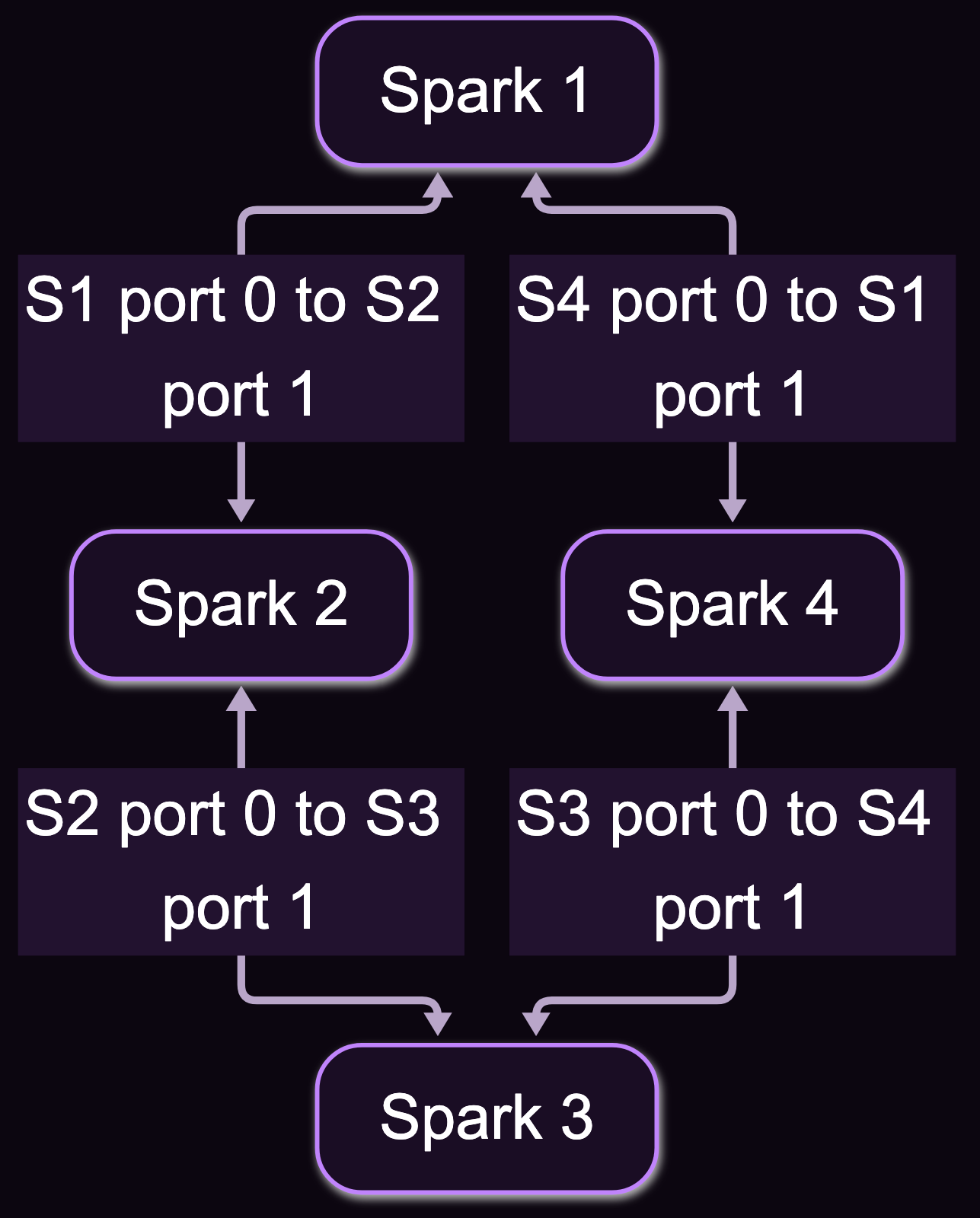
The switch takes one cable per Spark, on the same port number on every box. It gives you any-to-any connectivity and the only path past 4 that NVIDIA recommends.
How much does the switch buy at 4 nodes? Three sources, none of them mine:
| Source | Ring | Switch | Gain |
|---|---|---|---|
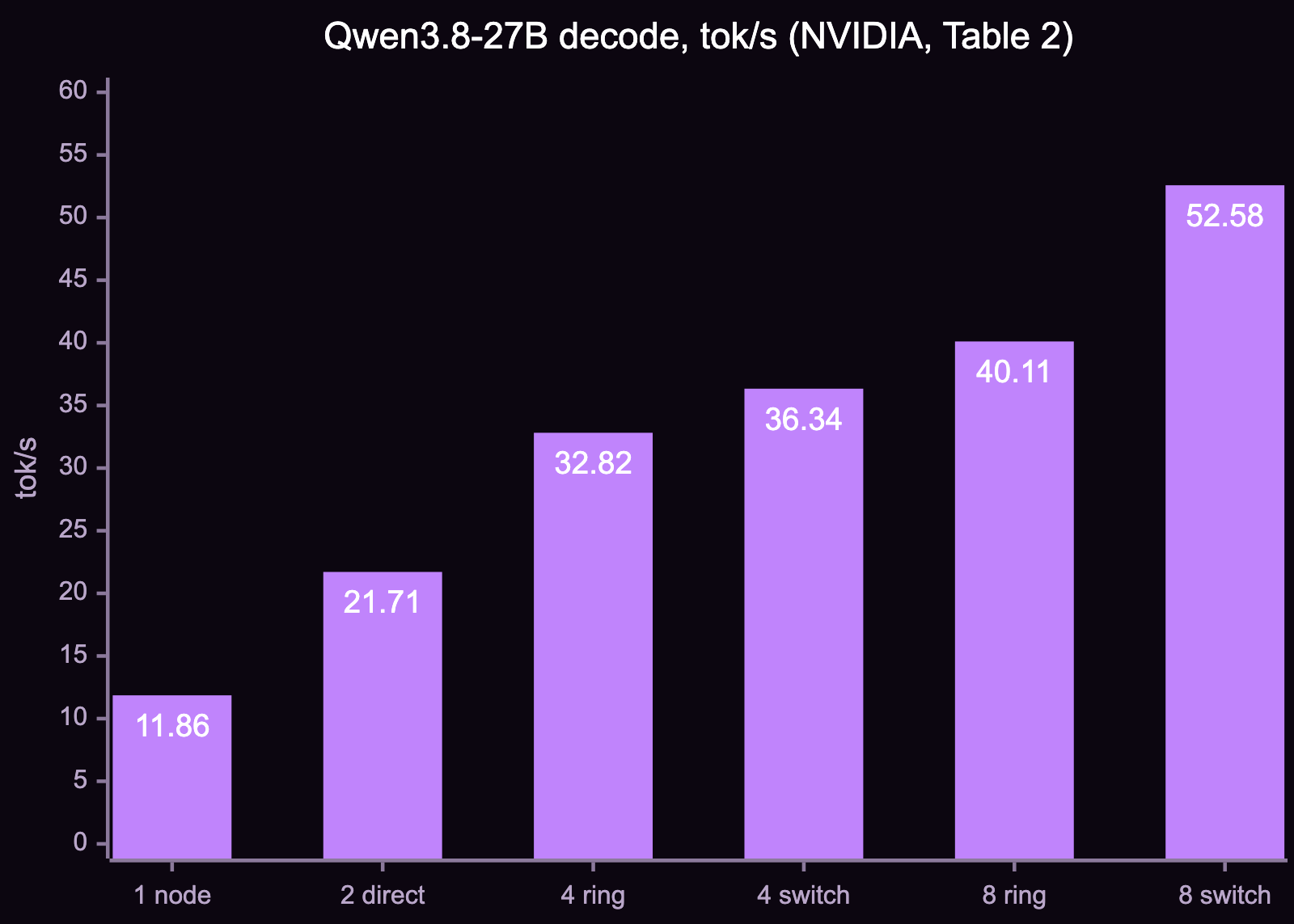
| NVIDIA, Qwen3.8-27B decode | 32.82 tok/s | 36.34 tok/s (with RoCEnante) | +10.7% |
| r/DGX_Spark, NCCL all-reduce, CRS812 | 23.8 GB/s | 24.1 GB/s | +1.3% |
| Same thread, a commenter’s DeepSeek-V4.1-Flash, CRS804 | 85.66 tok/s | 92.23 tok/s | +7.7% |
The Reddit numbers come from a cable seller and a commenter, and the runs differ, so read the range rather than any one row. The switch does not transform a 4-node cluster. Get a ring if 4 is your final size and one model spans all nodes. Get a switch if you want to split the cluster, run MPI-style all-to-all work, or use RoCEnante, the NVIDIA backend that only runs on switched clusters. NVIDIA gives the same reasoning in its post: a ring has no way to carve out independent groups.
5 to 8 Sparks: a switch
NVIDIA announced official 8-node support at GTC Berlin on 2026-10-22, with Sync support due by the end of the year. Until then, Sync and the helper stop at 4 through a switch, and beyond that you configure by hand. At 8 nodes NVIDIA measured 40.11 tok/s on a ring and 52.58 on a switch with RoCEnante, so here the switch earns its 31%.
The switches owners actually use, with prices from sellers’ pages in October and November 2026:
| Switch | Ports | Sparks at 200G | List price | Notes |
|---|---|---|---|---|
| MikroTik CRS504-4XQ-IN | 4 × 100G QSFP28 | 0 (4 at 100G) | $799 | Half speed, reported as easier to find; outside NVIDIA’s 200G guidance |
| MikroTik CRS804-4DDQ | 4 × 400G QSFP56-DD | 8 with breakouts | $1,295 | About 92 W typical |
| MikroTik CRS812-8DS-2DQ-2DDQ | 2 × 400G, 2 × 200G, 8 × 50G | 6 with breakouts | not checked | 4 breakout legs + 2 straight |
| NADDOD N9200-32DC | 32 × 400G | 64 with breakouts | $10,459 | SONiC, PFC and ECN; room for storage and uplinks |
Stock is a real constraint. A September forum thread had both MikroTiks on back order into January 2027, though another poster saw European inventory.
Breakouts belong on the switch side only: 1 400G port becomes 2 200G legs, and each Spark receives a whole, unsplit port.
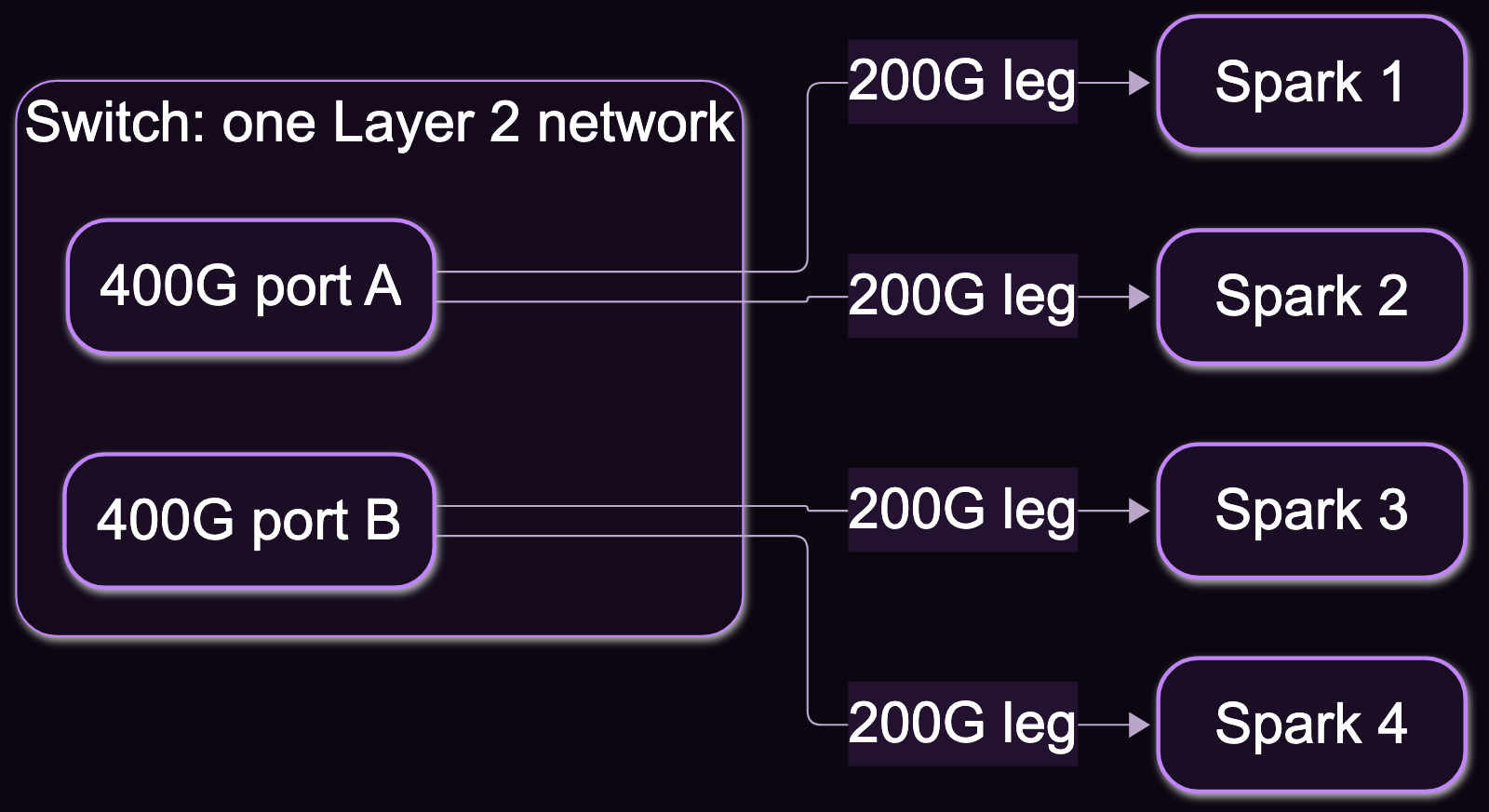
NVIDIA’s switch checklist is short: every Spark-facing port set to 200 Gb/s, all on one Layer 2 network, hardware offload confirmed, default MTU, and no mixing of direct and switched links. The addressing differs from direct cabling: 2 shared subnets across the cluster, with each Spark holding one address in each.
A switch is also where a healthy-looking link goes wrong. itadmin.blog describes 4 Sparks on a CRS804 stuck at about 10 Gb/s with clean 200G links, and 3 separate causes:
- The bridge was not hardware-offloaded. Unused breakout sub-ports sat in the management bridge, so traffic went through the switch CPU. High switch CPU load during a transfer gives it away.
- PFC stalled RoCE. Connections came up and data never flowed. That build ended on lossy RoCE with PFC off.
- Duplicate IPs across rails caused ARP flux. Every rail needs its own address.
After those fixes the build reached 109 Gb/s per rail and 23.33 GB/s NCCL at 4 nodes. On PFC, reports disagree: OpenZeka’s guide enables it on one priority. Don’t copy either recipe blind. Prove line rate after each change with an NCCL all-reduce.
The short version
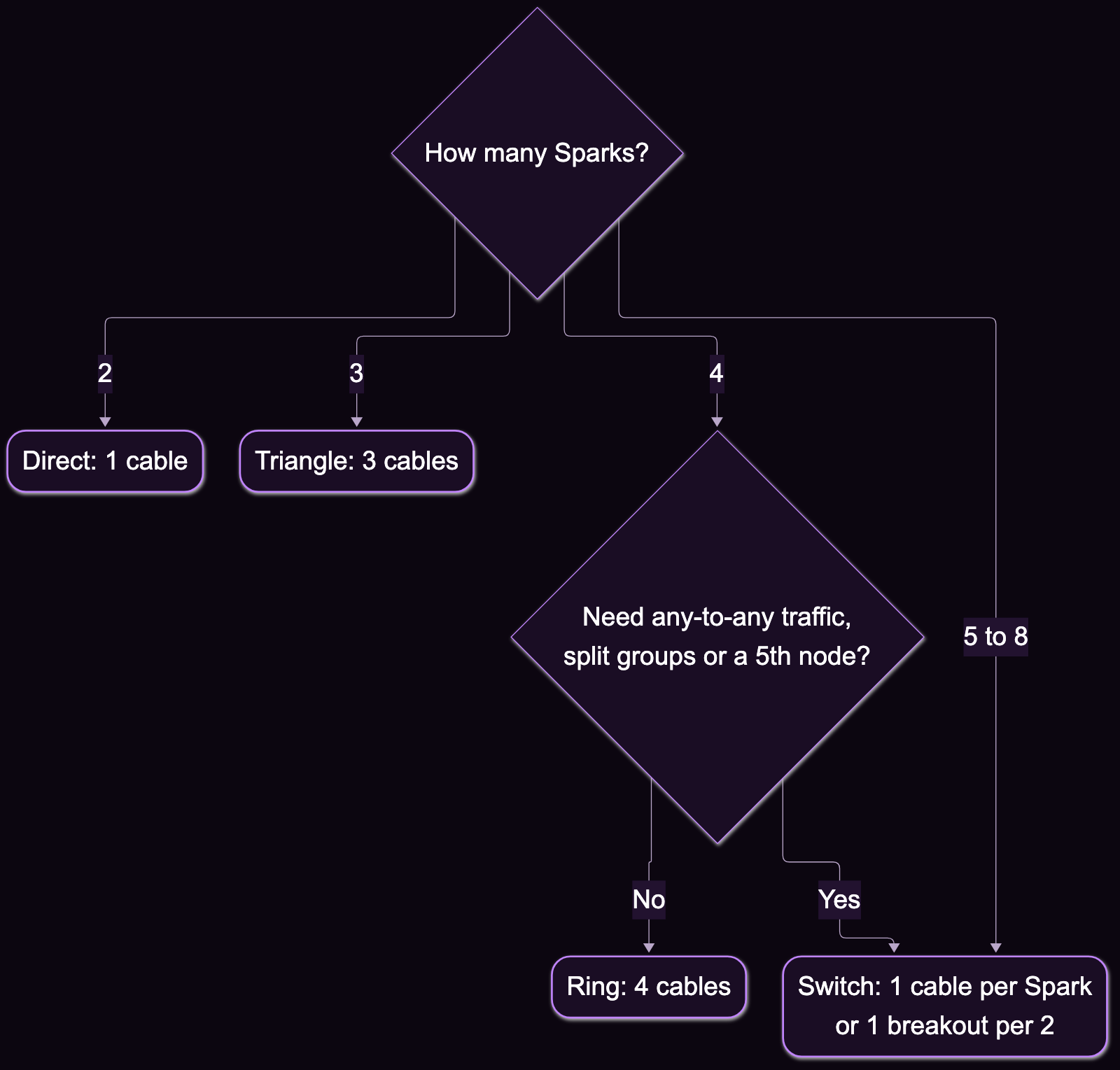
| Sparks | Layout | Cables | Bandwidth to expect | Setup |
|---|---|---|---|---|
| 2 | Direct | 1 | ~185 Gb/s (mine) | Sync or helper |
| 3 | Triangle | 3 | 200G on one link, ~100G each with both busy | Sync or helper |
| 4 | Ring | 4 | Same per-box total | Helper only |
| 4 | Switch | 4, or 2 breakouts | ~24 GB/s NCCL (others) | Sync or helper, switch by hand |
| 5–8 | Switch | 1 per Spark, or 1 per 2 | Same per-box total | By hand for now |
Whatever the size, the box has 2 rails, and no cable or topology adds a third.